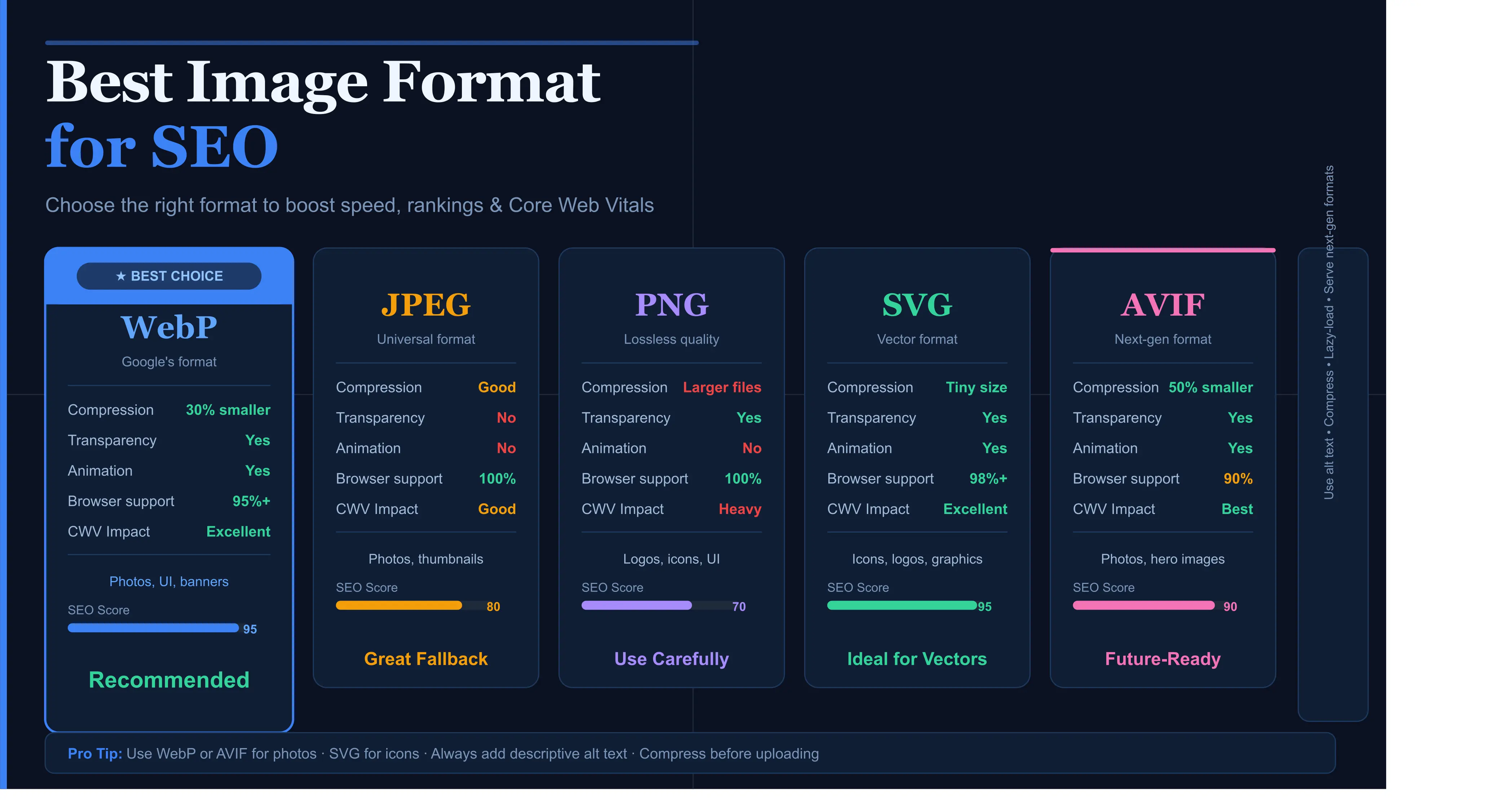
Images make up more than 50% of the average webpage's total weight. Choosing the wrong format doesn't just slow your site down — it directly signals to Google that your page delivers a poor user experience, pushing you down the search rankings.
When it comes to SEO, every millisecond matters. Page speed is a confirmed Google ranking factor, and the image formats you choose are one of the single biggest levers you have to control load time.
This guide breaks down every major image format — WebP, AVIF, SVG, JPEG, PNG, and GIF — through the lens of SEO performance, browser support, use cases, and practical implementation advice.
Why Image Format Is an SEO Decision, Not Just a Design Decision
Google's Core Web Vitals — specifically Largest Contentful Paint (LCP) and Cumulative Layout Shift (CLS) — are directly affected by how you handle images.
LCP measures how quickly the largest visible element on your page loads. In most cases, that element is an image.
Optimizing image formats is one of the fastest ways to improve LCP on most websites and support better SEO performance.
The Main Image Formats Compared for SEO
WebP
Excellent compression, wide browser support, ideal for most web images.
AVIF
Next-gen image format with excellent compression and smaller file sizes.
SVG
Perfect for logos, icons, and illustrations. Scales without quality loss.
JPEG
Universally supported, but usually larger than WebP and AVIF.
PNG
Useful for transparency, but often heavier than modern alternatives.
GIF
Outdated for animations. Use MP4, WebM, or animated WebP instead.
WebP: The SEO-First Default Choice
WebP is one of the best default image formats for SEO because it offers strong compression, good quality, transparency support, and wide browser compatibility.
SEO Tip: Use WebP as your primary format and always add explicit width and height attributes to reduce layout shift.
AVIF: The Future Format That Is Already Here
AVIF offers excellent compression and can produce smaller files than WebP at similar visual quality. It is useful for websites where every kilobyte matters.
For SEO, smaller file sizes can improve loading speed, LCP, and mobile performance.
SVG for SEO: The Underused Advantage
SVG is ideal for logos, icons, illustrations, and vector graphics. It stays sharp at every screen size and is usually very small.
SVG can include title and description metadata, making it useful for accessible and SEO-friendly graphics.
SEO Best Practices for Every Image Format
- ✅ Always write descriptive alt text. Describe the image clearly and naturally.
- ✅ Use keyword-rich file names. Rename files before uploading.
- ✅ Serve images at the correct size. Avoid uploading huge images for small display areas.
- ✅ Lazy-load below-the-fold images. Use loading="lazy" where appropriate.
- ✅ Use a CDN with image optimization. This can improve speed for global visitors.
Format Selection: A Decision Framework
| Use Case | Recommended Format | Fallback | SEO Priority |
|---|---|---|---|
| Photographs, hero images | AVIF | WebP → JPEG | LCP improvement |
| Product images | WebP | JPEG | Speed + quality |
| Logos, icons | SVG | WebP | Tiny file size |
| Screenshots | WebP lossless | PNG | Clarity |
| Animations | MP4 / WebM | Animated WebP | Size reduction |
Implementing Modern Formats with Fallbacks
The HTML picture element is useful for serving AVIF first, WebP second, and JPEG as a final fallback.
Use AVIF first, WebP second, and JPEG as a fallback. Always include width and height attributes to prevent layout shift.
The SEO Verdict: Prioritize WebP and AVIF in 2026
Start with AVIF for photographs where maximum compression is the goal. Use WebP as your everyday default for the best balance of support, quality, and performance.
Pair modern formats with descriptive alt text, keyword-optimized file names, responsive images, lazy loading, and structured data to improve SEO and user experience.