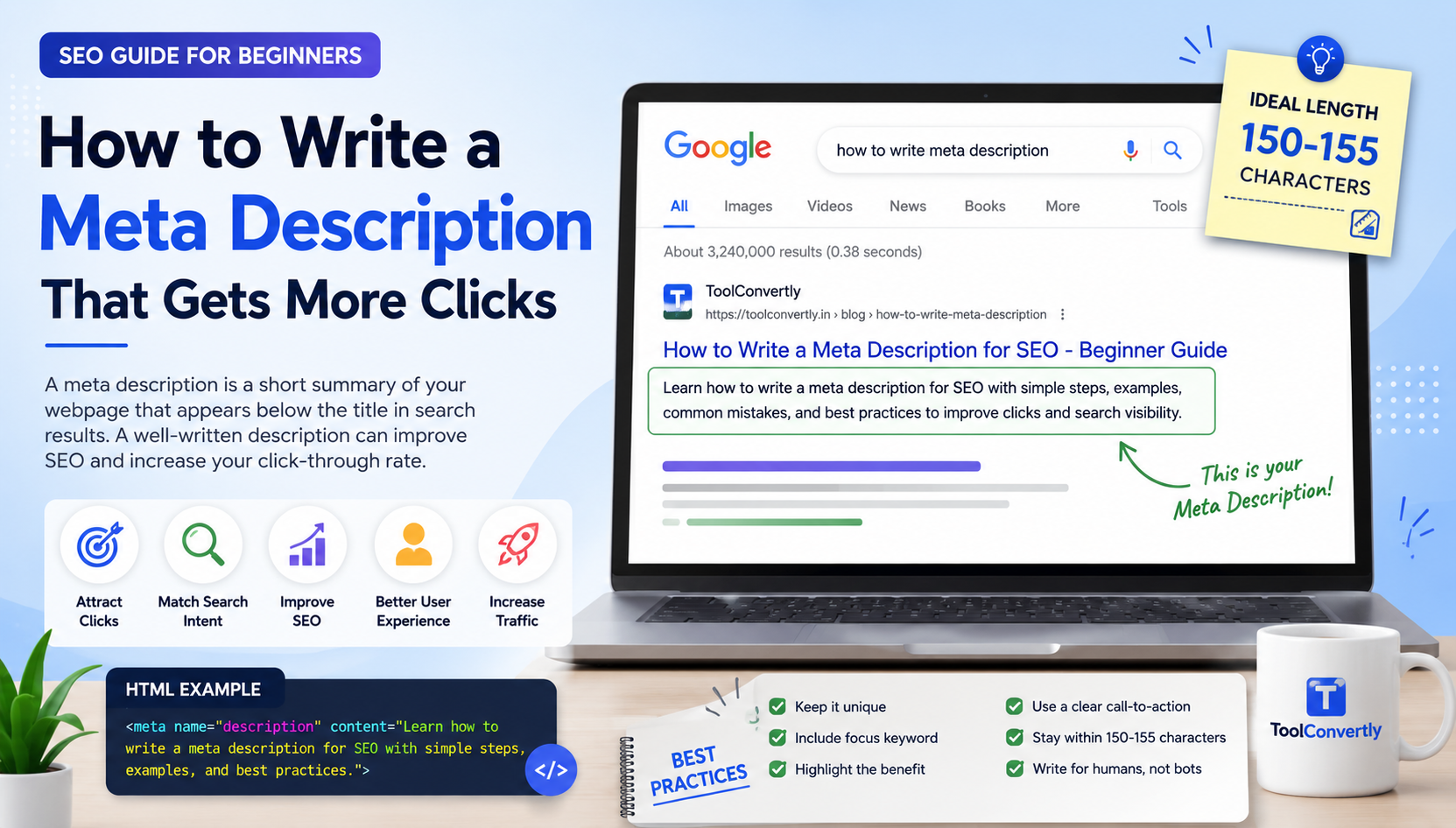
SEO Writing Guide
How to Write a Meta Description That Gets More Clicks
Learn how to write a clear, attractive, and SEO-friendly meta description for your website pages, blog posts, product pages, and online tools.
A meta description is a small piece of text that describes what a webpage is about. It often appears below the page title in Google search results. Even though it is short, it can make a big difference in how many people click your page.
Many beginners focus only on writing blog posts, adding keywords, and creating pages. But they forget the meta description. This is a mistake because a good meta description works like a mini advertisement for your page. It tells searchers why they should click your result instead of another website.
In this guide, you will learn what a meta description is, why it matters for SEO, how long it should be, how to write one step by step, common mistakes to avoid, and examples you can follow.
A good meta description should clearly explain what the page offers, include the main keyword naturally, stay around 150 to 155 characters, and give users a strong reason to click. You can check your description length using the free meta description length checker.
What Is a Meta Description?
A meta description is an HTML tag that gives a short summary of a webpage. It is placed inside the head section of a page and is mainly used to help search engines and users understand the page.
For example, if you write a blog post about image compression, your meta description may explain that the page teaches users how to reduce image size without losing quality.
This text may appear in search results. If it is written well, users are more likely to click your website.
Why Meta Description Matters for SEO
A meta description does not work like a magic ranking button. Simply writing a meta description will not automatically push your page to the first position. But it is still important for SEO because it can improve the way users interact with your search result.
SEO is not only about ranking. It is also about getting the right people to click your page. If your page appears in search results but your description is boring, confusing, or missing, users may choose another result.
Better Clicks
A clear meta description can encourage more people to click your result.
Clear Search Intent
It helps users quickly understand whether your page answers their question.
Professional Look
A well-written snippet makes your website look more trustworthy.
How Long Should a Meta Description Be?
A good meta description is usually around 150 to 155 characters. If it is too long, search engines may cut it. If it is too short, it may not give enough information to convince users.
You do not need to count every character manually. You can use a tool to check the length before publishing. For example, ToolConvertly has a meta description length checker for SEO that helps you see whether your description is too short, too long, or suitable.
How to Write a Meta Description Step by Step
Writing a good meta description becomes easier when you follow a simple process. Here are the steps beginners can use for any page.
Step 1: Understand the Page Purpose
Before writing anything, ask yourself what the page is actually about. Is it a blog post, tool page, product page, service page, or tutorial?
A meta description should match the page content. If your page teaches users how to write a meta description, the summary should clearly say that. If your page is a tool, the summary should mention what the tool does.
Step 2: Know the Search Intent
Search intent means what the user wants when they type a query into Google. For example, someone searching “how to write meta description” wants a beginner-friendly guide, examples, and practical tips.
If you understand the search intent, your meta description becomes more useful. It tells users that your page gives exactly what they are looking for.
Step 3: Add the Focus Keyword Naturally
Your focus keyword should appear naturally in the meta description. In this article, the focus keyword is “meta description.” It can be used in a simple sentence without forcing it.
Good example:
Learn how to write a meta description that improves SEO, attracts clicks, and clearly explains your webpage.
This is natural. It includes the keyword, but it does not sound robotic.
Step 4: Mention the Main Benefit
Users should immediately understand what they will gain by clicking your page. Will they learn something? Use a free tool? Save time? Avoid mistakes?
A benefit makes your description stronger. Instead of only saying “This post is about meta descriptions,” say what the reader will learn.
Better: Learn how to write a meta description that attracts clicks and improves your SEO snippet.
Step 5: Keep It Simple
Do not use complicated words. A search result appears quickly, and users scan it in seconds. Your meta description should be easy to understand.
Beginners often try to sound too technical. But simple writing usually performs better because it is clear.
Step 6: Add a Soft Call to Action
A call to action tells users what they can do next. You do not always need a strong sales line. A simple phrase like “Learn how,” “Find out,” “Check,” or “Use this guide” can work well.
Example:
Meta Description Examples
Here are some simple examples for different page types.
Blog Post Example
Learn how to write a meta description for SEO with easy steps, examples, best practices, and common mistakes to avoid.
Tool Page Example
Check your meta description length online and make sure your SEO snippet is clear, readable, and search-friendly.
Service Page Example
Get professional SEO services to improve your website content, meta tags, page speed, and search visibility.
Common Meta Description Mistakes
1. Writing Too Long Descriptions
If your meta description is too long, it may be cut in search results. This can make your message incomplete. Try to keep it short and meaningful.
2. Keyword Stuffing
Repeating the same keyword many times looks unnatural. For example, “meta description, best meta description, SEO meta description, write meta description” is not helpful. Use the keyword once naturally.
3. Using the Same Description on Every Page
Every important page should have a unique meta description. If multiple pages have the same description, users and search engines may not clearly understand the difference between those pages.
4. Making False Promises
Do not write misleading descriptions just to get clicks. If the user clicks and does not find what you promised, they may leave quickly. This creates a poor user experience.
5. Forgetting the User
A meta description is not only for search engines. It is mainly for people. Write it like you are explaining the page to a real person.
Simple Formula for Writing Meta Descriptions
You can use this simple formula:
Example:
This works because it tells the user what the page is about, what they will learn, and why it is useful.
Meta Description Checklist
Before publishing your page, check these points:
- Is the meta description clear?
- Does it explain the page correctly?
- Does it include the focus keyword naturally?
- Is it around 150 to 155 characters?
- Does it give users a reason to click?
- Is it unique for this page?
- Does it avoid keyword stuffing?
If your description passes these checks, it is usually good enough to publish.
FAQs About Meta Description
Conclusion
A meta description is small, but it plays an important role in how your page appears in search results. It helps users understand your page before they click. A good description can make your result look more useful, professional, and relevant.
To write a good meta description, keep it simple, explain the main benefit, include your focus keyword naturally, match search intent, and avoid keyword stuffing. Most importantly, write for real people, not only for search engines.
Before publishing, always check the length so your message does not get cut. A short, clear, and helpful description can improve your SEO presentation and bring more clicks from search results.
Check Your Meta Description Length
Use ToolConvertly to check whether your SEO description is short, clear, and search-friendly.
Open Meta Description Length Checker