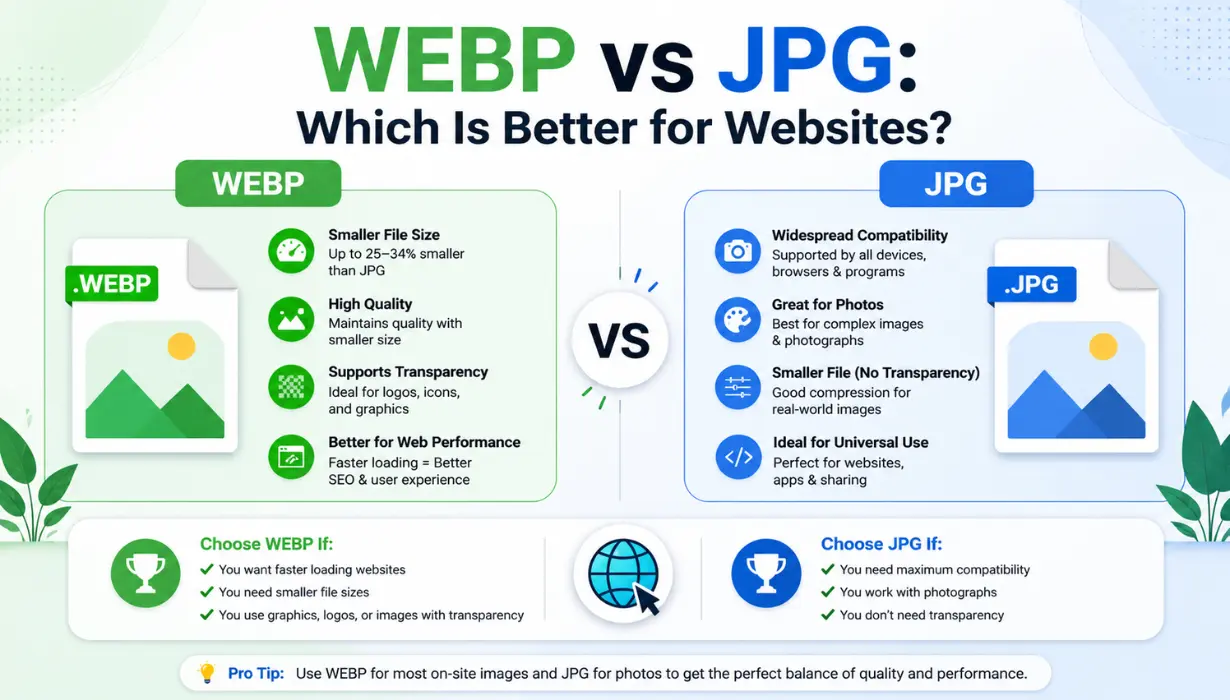
Introduction: Why Image Format Matters More Than Ever
In today’s digital landscape, page speed directly impacts user experience and search engine rankings. Choosing the right image format is now one of the most important decisions for website owners, bloggers, developers, and online businesses.
Whether you run an e-commerce store, a content-heavy blog, or a portfolio website, your images can strongly affect how quickly your pages load and how well they perform on Google. This is why the comparison between WEBP and JPG is so important.
In this guide, we will compare WEBP and JPG, understand their strengths and weaknesses, review SEO impact, and explain when you should use each format.
The Evolution of Image Formats on the Web
The web originally relied on formats like GIF for simple graphics, PNG for lossless images, and JPG for photographs. For decades, JPG remained the most common image format because it offered a strong balance between quality and file size.
But modern websites are much more image-heavy. Large image files can slow down pages, increase bandwidth usage, and hurt Core Web Vitals. WEBP was created to solve this problem by reducing file size while maintaining strong visual quality.
What Is JPG?
JPG, also known as JPEG, was developed in 1992 and became the standard format for photographs and complex images on the web. It uses lossy compression to reduce file size while keeping photos visually acceptable.
What Is WEBP?
WEBP is a modern image format developed by Google. It supports lossy compression, lossless compression, transparency, and animation, making it more flexible for modern websites.
Strengths and Limitations of JPG
✅ JPG Strengths
- Universal browser and device support
- Excellent for photographs
- Works well in email clients
- Supported by almost every editing tool
- Reliable for print and offline use
⚠️ JPG Limitations
- Larger file sizes than WEBP
- No transparency support
- No animation support
- Quality reduces after repeated saving
- Not optimized for modern web performance
Strengths and Limitations of WEBP
✅ WEBP Strengths
- Usually 25–35% smaller than JPG
- Supports transparency
- Supports animation
- Offers lossy and lossless compression
- Improves page speed and SEO performance
⚠️ WEBP Limitations
- Not ideal for email campaigns
- Older browsers may need fallback support
- Some older tools may not support it
- Not best for printing workflows
- Some platforms still prefer JPG or PNG
WEBP vs JPG: Quick Comparison
Real-World File Size Comparison
Product Photo
JPG: 420 KB
WEBP: 285 KB
Savings: 32%
Blog Hero Image
JPG: 680 KB
WEBP: 420 KB
Savings: 38%
Thumbnail Image
JPG: 45 KB
WEBP: 28 KB
Savings: 38%
WEBP’s Impact on Core Web Vitals and SEO
WEBP can improve page speed because smaller image files load faster. This can help improve Largest Contentful Paint, reduce bounce rates, and create a smoother user experience.
When Should You Convert WEBP to JPG?
JPG is safer for email campaigns because email clients may not fully support WEBP.
Some platforms and apps still prefer JPG for reliable sharing and previews.
Older website platforms may not accept or process WEBP images properly.
JPG or TIFF is better for printing because WEBP is designed mainly for screens.
Many stock photo and marketplace platforms require JPG, PNG, or TIFF.
JPG is easier for non-technical clients to open, edit, and share.
How to Convert WEBP to JPG
Online Converter
Best for quick one-time conversions without installing software.
Photoshop
Useful for professional workflows and quality control.
GIMP
A free alternative for users who want editing control.
Command Line
Best for developers converting many images at once.
When to Use WEBP and When to Use JPG
Use WEBP For
- Blog and article images
- E-commerce product photos
- Hero images and banners
- Photo galleries and portfolios
- Image-heavy landing pages
Use JPG For
- Email marketing campaigns
- Print-ready materials
- Client deliverables
- Legacy systems
- Maximum compatibility needs
Final Verdict: Which Format Wins?
There is no single winner for every situation. WEBP is the better choice for modern websites because it reduces file size and improves performance. JPG remains the best option when compatibility, email support, print use, or client delivery matters most.
The smart strategy is simple: use WEBP for website speed and SEO, and keep JPG as a fallback for situations where universal support is required.