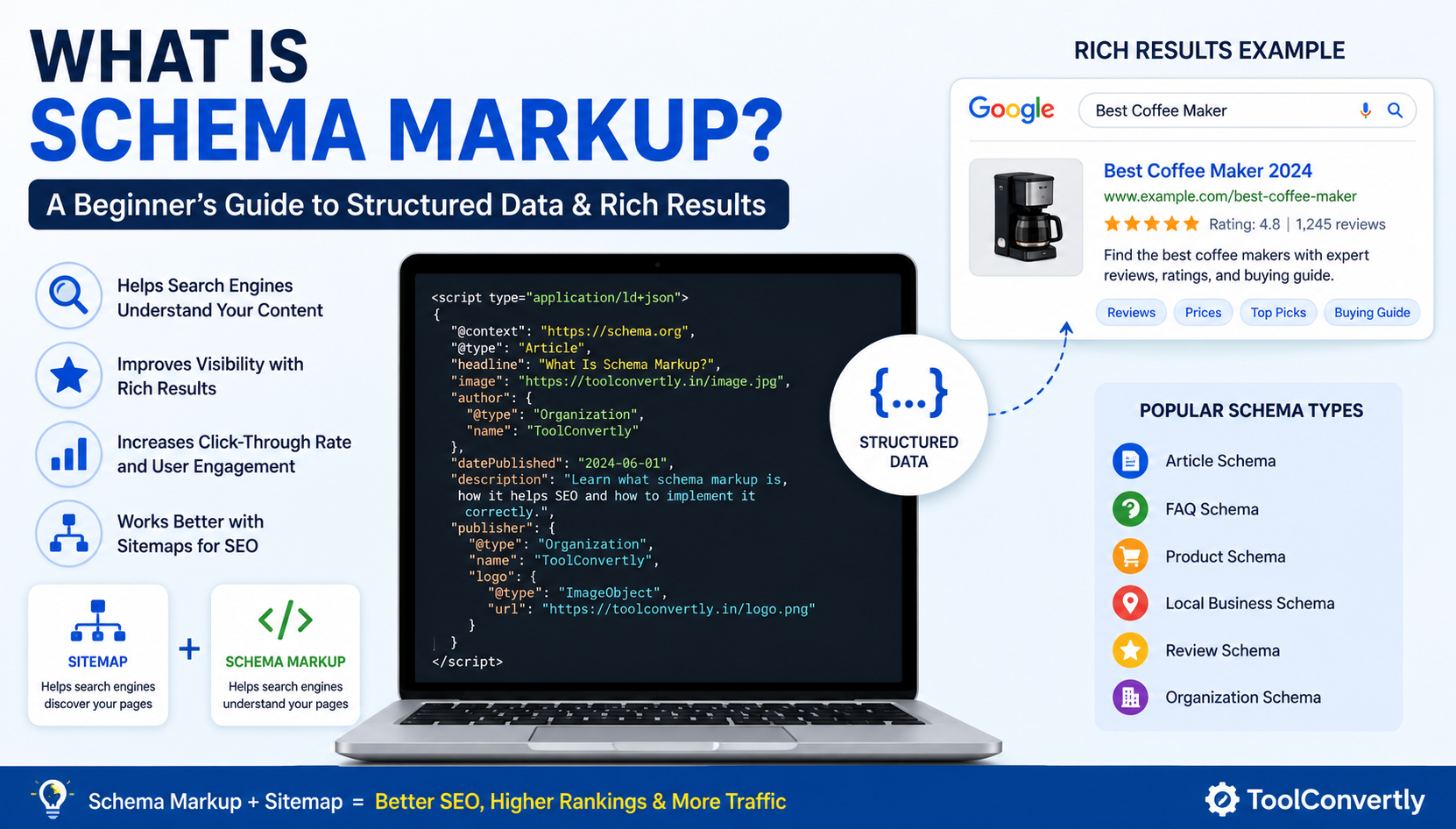
Have you ever searched for something on Google and noticed a result that showed star ratings, a list of FAQs, or a recipe with cook time — all right there in the search results?
Those eye-catching extras aren't magic. They're powered by something called schema markup — and once you understand it, you'll want to add it to every page on your website.
In this beginner-friendly guide, we'll break down exactly what schema markup is, why it matters for your SEO, how to implement it step by step, and how to avoid the most common mistakes people make.
What Is Schema Markup?
Schema markup (also called structured data) is a special vocabulary of code that you add to your website's HTML. It acts like a translator between your content and search engines.
Think of it this way: when you write a blog post, you understand that it has a title, an author, a publish date, and a main topic. But search engines like Google don't "read" pages the way humans do — they scan code. Schema markup tells them exactly what each piece of content means.
The schema vocabulary was created and is maintained by Schema.org, a collaborative project founded by Google, Bing, Yahoo, and Yandex back in 2011. Today, it covers hundreds of content types — from articles and products to events, recipes, and local businesses.
🔑 Key Takeaway: Schema markup doesn't change how your page looks to visitors. It works silently in the background — inside your page's code — to communicate with search engines.
Why Does Schema Markup Matter for SEO?
Schema markup matters because it directly influences how your pages appear in Google search results. When Google understands your content through structured data, it can display your listing as a rich result — a more visually rich and detailed search snippet.
Rich Results vs. Regular Results
A standard Google search result shows:
Studies consistently show that rich results earn a 20–30% higher click-through rate (CTR) than plain blue links. In a competitive SERP, that difference is enormous.
Other Benefits of Schema Markup
Better Visibility
Your listing stands out from competitors on the same page.
Better Understanding
Google comprehends your content more accurately.
Voice Search Ready
Structured data powers many voice assistant answers.
Knowledge Panels
Helps trigger entity cards and brand panels on Google.
Common Types of Schema Markup
There are hundreds of schema types, but you don't need to learn them all. Here are the most commonly used ones:
How Does Schema Markup Actually Work?
Schema markup is written in a format called JSON-LD (JavaScript Object Notation for Linked Data). It's the format Google recommends. The code lives inside a <script> tag in your page's HTML — completely invisible to visitors.
A Simple Example
Here's what FAQ schema markup looks like in JSON-LD format:
<script type="application/ld+json">
{
  "@context": "https://schema.org",
  "@type": "FAQPage",
  "mainEntity": [{
    "@type": "Question",
    "name": "What is schema markup?",
    "acceptedAnswer": {
      "@type": "Answer",
      "text": "Schema markup is structured data code that helps search engines understand your content."
    }
  }]
}
</script>
When Google crawls your page and finds this code, it reads it and — if it meets quality guidelines — uses it to generate a rich result in search.
Schema Markup vs. Sitemap — What's the Difference?
A common source of confusion for beginners is the difference between schema markup and a sitemap. While both are important SEO tools, they serve completely different purposes.
🗺 Sitemap
An XML file that lists all the URLs on your website. It tells search engines where your pages are so they can crawl and index them efficiently. It's like a table of contents for your site.
🏷 Schema Markup
Structured data added to individual pages. It tells search engines what the content on each page means — the context, entities, and relationships within the content.
In short: a sitemap helps Google find your pages; schema markup helps Google understand them. You need both for a solid technical SEO foundation.
How to Add Schema Markup to Your Website
Adding schema markup doesn't require you to be a developer. Here's a simple process anyone can follow:
Identify the Right Schema Type
Decide what kind of content your page has. Is it a blog post? A product page? A local business? A recipe? Visit Schema.org to find the correct schema type that matches your content.
Generate the Schema Code
You don't need to write schema code by hand. Use a free tool like the ToolConvertly Schema Generator to create accurate JSON-LD code in seconds. Just fill in your details and the tool builds the code for you.
Add the Code to Your Page
Paste the generated JSON-LD code into your page's <head> or <body> section. If you use WordPress, plugins like Yoast SEO or Rank Math can do this automatically.
Test Your Schema with Google's Rich Results Test
Before publishing, validate your markup using Google's Rich Results Test (search.google.com/test/rich-results). Paste your URL or code snippet and Google will show you whether your schema is valid and which rich results it qualifies for.
Monitor in Google Search Console
After publishing, open Google Search Console and navigate to Enhancements. You'll see a report for each schema type on your site, including any errors that need fixing.
Common Schema Markup Mistakes to Avoid
Even small errors in your schema code can prevent rich results from appearing. Watch out for these pitfalls:
❌ Marking Up Content Not Visible on the Page
Schema must describe what users actually see. Don't add review stars in your code if there are no reviews on your page.
❌ Using the Wrong Schema Type
Using "Product" schema on a blog post or "Article" schema on a product page confuses Google and will likely be ignored.
❌ Missing Required Properties
Each schema type has required and recommended properties. Missing required ones means Google may ignore your markup entirely.
❌ Adding Schema Only to Your Homepage
Schema markup should be added to every relevant page on your site — product pages, articles, contact pages, and more.
❌ Never Testing or Monitoring
Schema can break when you update your site. Check Google Search Console regularly to catch errors early.
FREE TOOL
Generate Schema Markup Instantly
No coding needed. Fill in your details and our free tool generates valid JSON-LD schema code in seconds — ready to copy and paste.
Try the Free Schema Generator →Frequently Asked Questions
Does schema markup directly improve my Google rankings? +
Not directly. Google has stated that schema markup is not a ranking factor. However, it can indirectly boost rankings by improving your click-through rate, which is a user-engagement signal that Google pays attention to.
Is schema markup required for every page? +
No, it's not required — but it is highly recommended for any page where a rich result would be beneficial. Prioritize your product pages, blog posts, FAQ sections, and contact/local pages.
How long does it take for schema markup to show in search results? +
It depends on how quickly Google re-crawls your page. For most sites, you can expect rich results to appear within a few days to a few weeks after Google crawls the updated page.
What is the difference between JSON-LD and Microdata? +
JSON-LD is a separate script block in your HTML. Microdata is embedded directly inside your HTML tags. Google strongly recommends JSON-LD because it's easier to add, maintain, and test without touching the visible structure of your page.
Can I add multiple schema types to one page? +
Yes. You can include multiple JSON-LD blocks on a single page. For example, a blog post could have both Article schema and FAQ schema if it contains a FAQ section at the bottom.
Is schema markup free to implement? +
Completely free. Schema markup is an open standard. You can generate, add, and test it at zero cost using tools like the ToolConvertly Schema Generator and Google's Rich Results Test.
Conclusion
Schema markup is one of those SEO techniques that looks technical on the surface but is surprisingly approachable once you understand the basics. At its core, it's simply a way to speak Google's language — giving search engines the context they need to present your content in the best possible light.
Whether you run a blog, an e-commerce store, a local service business, or a news site, there's a schema type designed for your content. And with free tools that generate the code for you, there's no reason to put it off.
Start small: pick your most important page, add the appropriate schema markup, test it with Google's Rich Results Test, and watch your search listings transform. Then scale it across your site page by page.
Combined with a well-structured sitemap that helps Google discover all your pages, schema markup completes the technical SEO puzzle — giving your site every possible advantage in an increasingly competitive search landscape.
Ready to add schema markup to your site?
Generate valid JSON-LD structured data in seconds — no coding required.
Use the Free Schema Generator on ToolConvertly →